
Help: how to install and use Self Guide App
Videos first, then the full manual - the same HELP that is inside every guide.
🎥 Videos


📖 The full manual
Shown for the Sydney guide; the other guides work the same way. The route buttons work inside the guide.
✅ Before you start
- Allow GPS access in your browser. When you press Start Audio Tour, the browser will ask for location permission — tap Allow. Without GPS the tour cannot trigger commentary as you move.
- Set your screen to never sleep. iPhone: Settings → Display & Brightness → Auto-Lock → Never. Android: Settings → Display → Screen timeout → longest option.
- Plug into a car charger — GPS and audio drain battery fast.
- Connect to car Bluetooth or AUX so all passengers hear the commentary.
📍 During the tour
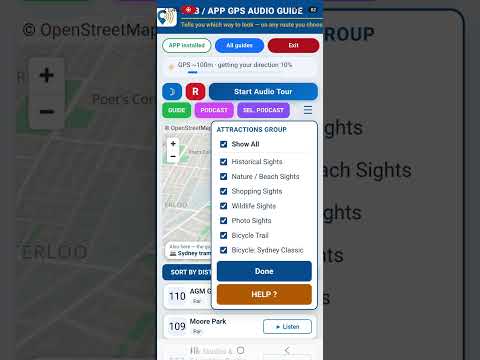
- Press Start Audio Tour — the interest categories menu opens automatically.
- Tick the categories you want (Historical, Nature, Shopping, Wildlife, Photo), then press Done.
- Tap 🚗 DRIVING or 🚶 WALKING — the suggested route loads onto the map as a dotted blue line. Just follow it. Or take your own route — commentary will trigger automatically whenever you pass any landmark within ~50 m.
Both GUIDE and PODCAST are ON by default (lit buttons) — everything plays automatically as you drive. You can turn off either button any time:
-
Tap PODCAST — button fades. Only attraction commentary plays as you approach each landmark (non-stop Australia narration stops).
Tap GUIDE — button fades. Nothing plays automatically — tap ▶ Listen on any card to play that attraction manually.
🔴 Reset (red R button, top-left next to the day/night toggle): the tour remembers which attractions you have already heard on this device — even the next day — and won't repeat them. If the attraction cards look greyed-out (marked ✓ Played) and stay silent as you pass them — that's why. Tap the red R to erase that history so the whole tour plays again from the start — use it to reuse the guide on another day, or when running the tour repeatedly. It also clears the route from the map and brings back the 🚗 DRIVING / 🚶 WALKING route buttons so you can load a route again. Works in the full version of the guide.
🗺️ Map controls: tap the compass icon to switch North Up / Heading Up — Heading Up turns the map with you and tilts the view like a car navigator. Two-finger gestures are enabled: twist to turn the map, slide both fingers up or down to tilt, pinch two fingers together to zoom out or spread them apart to zoom in. On a computer hold Ctrl and drag; + / − to zoom. Tap any pin to bring that attraction’s card to the top of the list.
🗺️ Choose your route
ℹ️ Good to know
- 🚘 Android Auto on a cable: pause and play from the player on the car’s screen. On some cars the steering wheel’s mute button only silences the speakers and the guide keeps talking. Over Bluetooth the same button pauses the guide.
- 🔑 Your link, not your phone. What you bought is the access link: open it on any phone, tablet or laptop and the guide moves there. It plays on one device at a time — whichever device opened the link last — so if you switch, just open your link again on the new device.
- This is a browser-based phone tour — runs on your phone; in any car the audio plays through your car speakers via Bluetooth, no app download required.
- No meeting point, no start time. Wherever you are in Sydney, the tour starts where you stand: the nearest story plays first, and the list re-sorts itself as you move.
- Mobile data is required to stream audio. Keep this tab in the foreground — switching apps may reload and restart the tour.
- Works equally well in a car, on a bicycle, or from a hop-on bus — GPS adapts to your speed.
- Tunnels: in Sydney Harbour Tunnel, Cross City Tunnel and underground car parks audio and maps pause until signal returns.
- Manual controls: tap a pin or ▶ Listen on any card to play manually. Tap Navigate to open Google Maps directions. SORT BY DISTANCE / NUMBER is under the map, next to DOWNLOAD ROUTE. Toggle ☽ for day/night theme.
- 🎧 SELECT PODCAST opens the contents of the podcast — over thirteen hours of it. First comes Sydney: the story of the city from its founding to today and every Sydney topic. Then Australia today, short parts and long ones on sport and Australian records, History, the story of the whole country, Cities of Australia with the other cities, and Nature with long ones on whales, kangaroos, Featherdale, unique Australian animals and animal invaders, then fourteen long-form topics under Thematic podcasts. Tap a topic and it starts there; Close returns you to the map having changed nothing. Left alone, the podcast plays through in its own order between attractions, and an attraction always interrupts it.
- Fullscreen auto-activates on Start. Exit via Stop Tour, swipe down (mobile), or Esc (desktop).
- ⚠ Do not reload this page while touring — reloading resets all progress and settings.
By using this tour you agree to our Terms & Conditions. Keep your eyes on the road at all times. Your location is used to run the guide, and a record of each tour, linked to your access link, is kept to help you and improve the guide — see our Privacy Policy.
Questions? Write to [email protected].
Помощь: как установить Self Guide App и пользоваться гидом
Сначала видео, потом полное руководство — тот же HELP, что внутри каждого гида.
🎥 Видео

📖 Полное руководство
На примере гида по Сиднею; остальные гиды работают так же. Кнопки маршрутов работают внутри гида.
✅ Перед началом
- Разрешите доступ к GPS в браузере. Когда вы нажмёте Начать аудиотур, браузер попросит доступ к геолокации — нажмите Разрешить. Без GPS тур не сможет включать рассказ по мере движения.
- Отключите автоблокировку экрана. iPhone: Настройки → Экран и яркость → Автоблокировка → Никогда. Android: Настройки → Экран → Тайм-аут экрана → максимум.
- Подключите зарядку в авто — GPS и аудио быстро сажают батарею.
- Подключитесь к Bluetooth или AUX автомобиля, чтобы рассказ слышали все пассажиры.
📍 Во время тура
- Нажмите Начать аудиотур — меню категорий откроется автоматически.
- Отметьте нужные категории (Исторические, Природа, Шопинг, Дикая природа, Фото) и нажмите Готово.
- Нажмите 🚗 АВТО или 🚶 ПЕШКОМ — выбранный маршрут появится на карте пунктирной синей линией. Просто следуйте ей. Или идите/езжайте своим маршрутом — рассказ включится автоматически, когда вы окажетесь в пределах ~50 м от любой точки.
ГИД и ПОДКАСТ по умолчанию ВКЛючены (кнопки горят) — всё играет автоматически по ходу движения. Любую кнопку можно отключить в любой момент:
-
Нажмите ПОДКАСТ — кнопка гаснет. Играет только рассказ об аттракциях по мере подъезда (непрерывный рассказ об Австралии выключается).
Нажмите ГИД — кнопка гаснет. Автоматически ничего не играет — нажмите ▶ Слушать на любой карточке для воспроизведения вручную.
🔴 Сброс (красная кнопка R, слева вверху рядом с переключателем день/ночь): гид запоминает, какие аттракции вы уже слушали на этом устройстве — даже на следующий день — и не повторяет их. Если карточки аттракций серые (отмечены галочкой ✓) и молчат при проезде — вот почему. Нажмите красную R, чтобы стереть эту историю и пройти весь тур заново с начала — так можно переиспользовать гид на другой день или водить тур многократно. Также очищается маршрут с карты и возвращаются кнопки 🚗 АВТО / 🚶 ПЕШКОМ, чтобы можно было снова загрузить маршрут. Работает только в полной версии гида.
🗺️ Операции с картой: значок компаса переключает На север / По движению — во втором режиме карта поворачивается за вами и наклоняется, как в автонавигаторе. Жесты двумя пальцами включены: поверните пальцы — карта повернётся, проведите двумя пальцами вверх или вниз — наклон, а масштаб — сведите два пальца, чтобы отдалить, или раздвиньте, чтобы приблизить. На компьютере держите Ctrl и тяните мышью; масштаб — + / −. Нажатие на метку поднимает карточку аттракции наверх списка.
🗺️ Выбор маршрута
ℹ️ Полезно знать
- 🚘 Android Auto по кабелю: паузу и продолжение нажимайте в плеере на экране машины. На некоторых машинах кнопка «без звука» на руле только глушит динамики, а гид продолжает говорить. По Bluetooth та же кнопка ставит гид на паузу.
- 🔑 Ваша ссылка, а не ваш телефон. Вы покупаете саму ссылку доступа: откройте её на любом телефоне, планшете или ноутбуке — гид переедет туда. Работает на одном устройстве одновременно — на том, где ссылку открыли последней; меняете устройство — просто откройте на нём свою ссылку снова.
- Это веб-тур в браузере — работает на телефоне; в любом авто аудио идёт через колонки по Bluetooth, скачивать приложение не нужно.
- Нужен мобильный интернет для потокового аудио. Держите эту вкладку активной — переключение приложений может перезагрузить и сбросить тур.
- Одинаково хорошо работает в авто, на велосипеде или в экскурсионном автобусе — GPS подстраивается под скорость.
- Тоннели: в Sydney Harbour Tunnel, Cross City Tunnel и подземных парковках аудио и карта приостанавливаются до возвращения сигнала.
- Ручное управление: нажмите метку или ▶ Слушать на карточке для ручного воспроизведения. Нажмите Маршрут, чтобы открыть навигацию в Google Maps. Кнопка ПО РАССТОЯНИЮ / ПО НОМЕРУ теперь под картой, рядом с СКАЧАТЬ МАРШРУТ. Кнопка ☽ — день/ночь.
- 🎧 ВЫБРАТЬ ПОДКАСТ открывает оглавление подкаста — больше четырнадцати часов. Первым идёт раздел Сидней: история города от основания до наших дней и все сиднейские темы. Затем раздел Австралия сегодня — короткие части и длинные про спорт и рекорды Австралии, История всей страны, Города Австралии с другими городами и Природа, в ней длинные — про китов, кенгуру, парк Featherdale, уникальных австралийских животных и животных-пришельцев, затем четырнадцать длинных тем в разделе Тематические подкасты. Нажмите тему — подкаст начнётся с неё; Закрыть вернёт карту, ничего не изменив. Если не трогать, подкаст играет по порядку между аттракциями, а рассказ об аттракции его всегда прерывает.
- Полный экран включается на старте. Выход — Остановить тур, свайп вниз (моб.) или Esc (десктоп).
- ⚠ Не перезагружайте страницу во время тура — перезагрузка сбросит весь прогресс и настройки.
Используя этот тур, вы соглашаетесь с нашими Условиями. Всегда следите за дорогой. Геопозиция нужна для работы гида; запись каждой поездки, привязанная к вашей ссылке доступа, хранится, чтобы помочь вам и улучшить гид, — см. Privacy Policy.
Вопросы? Пишите на [email protected].
ヘルプ:Self Guide Appのインストールと使い方
まず動画、そのあとに詳しいマニュアル(各ガイドの中のHELPと同じ内容)です。
🎥 動画


📖 詳しいマニュアル
シドニーのガイドを例にしています。ほかのガイドも使い方は同じです。ルートのボタンはガイドの中で使えます。
✅ はじめる前に
- 位置情報を許可してください。「ツアー開始」を押すと、ブラウザが位置情報の使用を確認します。「許可」をタップしてください。
- 画面が消えないように設定してください。iPhone:設定 → 画面表示と明るさ → 自動ロック → なし。Android:設定 → ディスプレイ → 画面のタイムアウト → 最長。
- 車ではスマートフォンを充電し、Bluetoothで車のスピーカーにつなぐと、全員で聴けます。
📍 ツアー中
- ツアー開始を押すと、名所に近づくたびに解説が自動で流れ、「左側に」「右側に」と見る方向も伝えます。
- 名所と名所のあいだは、シドニーの歴史のポッドキャストが流れます。ポッドキャスト選択で好きな回を選べます。
- カードの▶ 聴くを押すと、いつでもその名所の解説を聴けます。地図の番号をタップするとカードが一番上に来ます。
- ☰で、聴きたい名所のグループを選べます。
🗺️ Choose your route
ℹ️ ご案内
- 購入したアクセスリンクは、1台のスマートフォンで使えます。別の端末に移すときは、その端末でリンクを開いてください。
- 音声の再生にはモバイルデータが必要です。ツアー中はこのページを開いたままにしてください。
- トンネルや地下駐車場では、電波が戻るまで音声と地図が止まります。
By using this tour you agree to our Terms & Conditions. Keep your eyes on the road at all times. Your location is used to run the guide, and a record of each tour, linked to your access link, is kept to help you and improve the guide — see our Privacy Policy.
ご質問は [email protected] へどうぞ。
도움말: Self Guide App 설치와 사용법
먼저 영상, 그다음 자세한 설명서예요. 각 가이드 안의 HELP와 같은 내용이에요.
🎥 영상


📖 자세한 설명서
시드니 가이드를 예로 들었어요. 다른 가이드도 사용법은 같아요. 경로 버튼은 가이드 안에서 쓸 수 있어요.
✅ 시작하기 전에
- 위치 사용을 허용해 주세요. ‘투어 시작’을 누르면 브라우저가 위치 사용을 묻습니다. ‘허용’을 눌러 주세요.
- 화면이 꺼지지 않게 설정해 주세요. 아이폰: 설정 → 디스플레이 및 밝기 → 자동 잠금 → 안 함. 안드로이드: 설정 → 디스플레이 → 화면 자동 꺼짐 → 가장 길게.
- 차에서는 휴대폰을 충전하고 블루투스로 차 스피커에 연결하면 모두 함께 들을 수 있습니다.
📍 투어 중에는
- 투어 시작을 누르면 명소에 다가갈 때마다 설명이 자동으로 재생되고, ‘왼쪽에’, ‘오른쪽에’ 하고 볼 방향도 알려 줍니다.
- 명소와 명소 사이에는 시드니 역사 팟캐스트가 흐릅니다. 팟캐스트 선택에서 원하는 편을 고를 수 있습니다.
- 카드의 ▶ 듣기를 누르면 언제든 그 명소의 설명을 들을 수 있습니다. 지도의 번호를 누르면 그 카드가 맨 위로 옵니다.
- ☰ 에서 듣고 싶은 명소 그룹을 고를 수 있습니다.
🗺️ Choose your route
ℹ️ 알아 두세요
- 구매한 이용 링크는 휴대폰 한 대에서 사용할 수 있습니다. 다른 기기로 옮길 때는 그 기기에서 링크를 열어 주세요.
- 음성 재생에는 모바일 데이터가 필요합니다. 투어 중에는 이 페이지를 열어 두세요.
- 터널과 지하 주차장에서는 신호가 돌아올 때까지 음성과 지도가 멈춥니다.
By using this tour you agree to our Terms & Conditions. Keep your eyes on the road at all times. Your location is used to run the guide, and a record of each tour, linked to your access link, is kept to help you and improve the guide — see our Privacy Policy.
문의는 [email protected]로 보내 주세요.